
This article is a work is progress as we have only encountered this issue twice and haven't confirmed all details/causes.
however, if you're having trouble installing a named instance of SQL Server Express (i.e the Framework SQL installer) and the installer fails with a generic error (I believe it was 0x84B00001), check whether the machine is joined to a domain. If it is, try installing a default (unnamed) SQL instance to see if that succeeds. Alternatively, during a custom installation, manually name the instance (IDEALSQL) and set the SQL Server Database Engine service account to NT AUTHORITY\SYSTEM. This approach has worked in domain environments where permission issues caused by trying to install the named instance while logged in as a local user account prevented installation.

Change SQL Server Database Engine's 'Account Name' to be NT AUTHORITY\SYSTEM
This fix was used again for a site that was displaying different symptoms, in this case both the named and generic instances would fail to install with the following error.
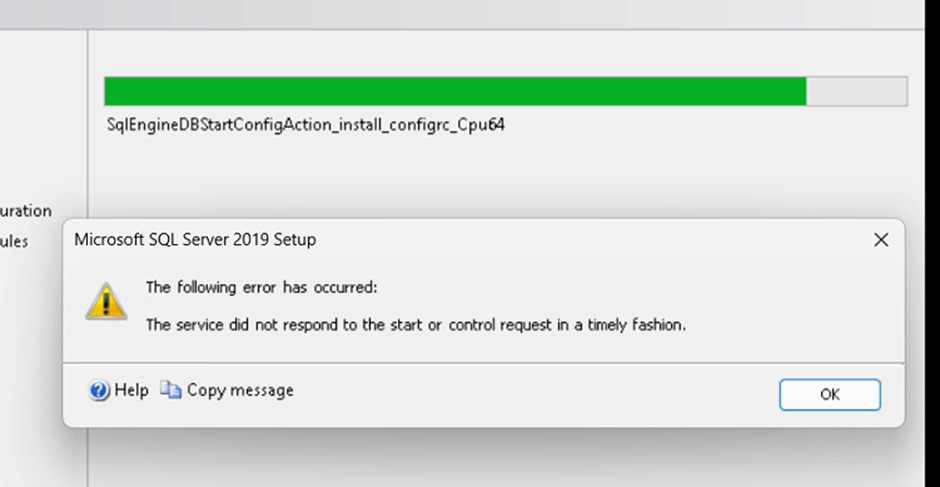
The service did not respond to the start or control request in a timely fashion.
The owner of the machine was not aware of anything unusual about the setup or user accounts.
however, if you're having trouble installing a named instance of SQL Server Express (i.e the Framework SQL installer) and the installer fails with a generic error (I believe it was 0x84B00001), check whether the machine is joined to a domain. If it is, try installing a default (unnamed) SQL instance to see if that succeeds. Alternatively, during a custom installation, manually name the instance (IDEALSQL) and set the SQL Server Database Engine service account to NT AUTHORITY\SYSTEM. This approach has worked in domain environments where permission issues caused by trying to install the named instance while logged in as a local user account prevented installation.
Change SQL Server Database Engine's 'Account Name' to be NT AUTHORITY\SYSTEM
This fix was used again for a site that was displaying different symptoms, in this case both the named and generic instances would fail to install with the following error.
The service did not respond to the start or control request in a timely fashion.
The owner of the machine was not aware of anything unusual about the setup or user accounts.